Code · Mac app
LUTzy
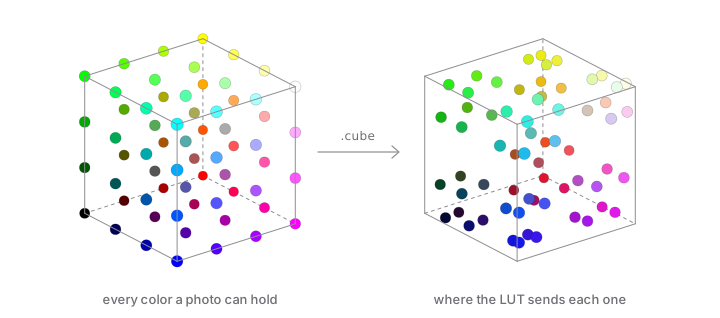
A Mac app for color-grading RAW photos with .cube LUTs. It also runs the other direction and turns a camera's JPEG look back into a LUT you can use anywhere.
Download → Source on GitHub → v0.1.3 · free · MIT
§ What it does
If you grade with 3D .cube LUTs, you want to see how a look lands on the actual RAW file, not on the JPEG preview baked into it. LUTzy develops the RAW itself with Core Image, shows the LUT side by side with the original, and exports at full resolution.
It also works backwards. Give it a RAW and the in-camera JPEG of the same frame, and it captures the camera's look (the manufacturer's color science or a picture profile) as a reusable LUT, plus a report of what it measured.
§ Features
- Opens DNG, CR2, CR3, NEF, ARW, ORF, RAF, RW2, PEF, SRW, X3F, plus JPEG, PNG, TIFF, BMP and HEIC.
- Imports a file, a folder, several files, up to 50 pictures from Photos, or a bitmap from any app.
- A LUT sidebar that scans folders, groups them by subfolder, and is searchable.
- Side-by-side or single preview. Hold Space to see the original.
- An inspector with a histogram, EXIF info, RAW develop controls, and nine adjustment sliders.
- A filmstrip for stepping through a folder with the current look kept on.
- Exports 16-bit TIFF, JPEG or PNG at full resolution.
§ At a glance
| Runs on | macOS 26 · Universal |
| Version | 0.1.3 · Sept 14, 2026 |
| Price | Free |
| License | MIT |
| Dependencies | None |
| Built with | SwiftUI · Core Image · Metal |
§ Deriving a LUT from a camera JPEG
- Develops the RAW with neutral settings and decodes the JPEG.
- Lines the two up by luma cross-correlation and masks the edges.
- Samples about 200,000 pixel pairs and fills a 33×33×33 cube.
- Writes a
.cubefile and a report: tone curve, saturation, sharpening, coverage, alignment, and camera EXIF. - Sharpening is measured and reported, never applied, because a cube can't sharpen.
§ Questions
- Can a LUT sharpen or blur my photo?
- No. A LUT only remaps colors, so it can be a look but never a sharpen or a blur. When LUTzy derives a LUT, it measures sharpening and reports it.
- Does LUTzy use the RAW file or its embedded preview?
- The RAW itself, decoded with Core Image's
CIRAWFilter, not the embedded JPEG preview. - What do I need to derive a LUT from a camera JPEG?
- A RAW and a JPEG of the same frame, with aspect ratios within 1%. The pixel sizes can differ. Use File ▸ Derive LUT from JPG… (⌘D).
- Which Macs does it run on?
- Macs running macOS 26. The release build is universal, for Apple silicon and Intel.