Code · Browser extension
Post Peek
Read one X post and leave. A Chrome and Firefox extension that opens x.com and twitter.com post links in a popup instead of sending you to the full site.
Add to Chrome → Add to Firefox → Source on GitHub → v1.2.0 · free · MIT
§ What it does
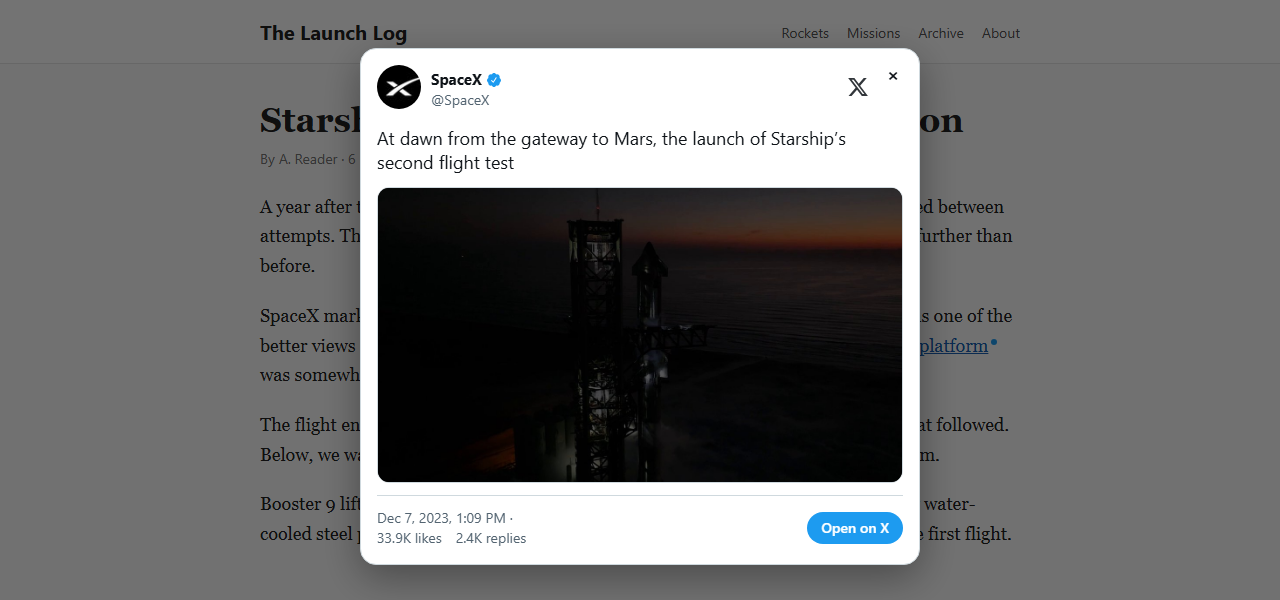
Someone links an X post in an article, and clicking it sends you to the full site and everything around the one post you wanted. Post Peek opens that post in a popup on the page you're already reading, so you can read it and close it.
It gets the post from X's public syndication endpoint, the same one behind X's own embedded posts. It never sends your cookies or a referer, so X can't tie the peek to your account or see which site you were on. You don't need an X account.
§ Features
- Opens post links in a popup so you can read just that post and close it.
- Marks links it can open with a small blue dot.
- Shows text, photos, video, link cards, quoted posts, and reply context.
- Quoted posts and “Replying to” open in the same popup.
- Ctrl/Cmd-, Shift-, Alt- or middle-click still opens the link normally.
- A toolbar button toggles peeking and the dot, and sets the popup theme.
§ At a glance
| Works in | Chrome · Firefox 140+ |
| Version | 1.2.0 · Sept 13, 2026 |
| Price | Free |
| License | MIT |
| Data collected | None |
| Account needed | No |
§ Privacy
- Never sends cookies or a referer to X. Posts and media are fetched anonymously.
- Never scans the page or touches its links. The dot is pure CSS, and only the link you click is inspected.
- Nothing for websites to probe: no web-accessible resources, and with dots turned off nothing at all is written to the page.
- Settings stay on your device in local extension storage and are never synced.
- No data collection. See the privacy policy.
§ Credit
Post Peek exists because of Litterbox, a Safari extension for iPhone, iPad, and Mac by Zhenyi Tan (And a Dinosaur). Litterbox came first with the core ideas: open a linked post in a popup, mark the links it can handle, fetch through the same API X uses for its embeds, and leave a link out to X. If you use Safari, use Litterbox.
Post Peek is a separate Chrome and Firefox version of that idea, written from scratch. It isn't affiliated with Zhenyi Tan, And a Dinosaur, or X Corp.
§ Elsewhere
Linked on Daring Fireball, September 12, 2026.
§ Questions
- Is Post Peek free?
- Yes. It's free on the Chrome Web Store and Firefox Add-ons, and the source is MIT-licensed on GitHub.
- Do I need an X account?
- No. Posts come from X's public syndication endpoint, the one behind embedded posts, and no cookies are sent.
- Does it work in Safari?
- No. For Safari, use Litterbox, the extension that inspired Post Peek.
- How do I open a link normally?
- Ctrl/Cmd-, Shift-, Alt- or middle-click the link, or use the Open on X button in the popup.