Code · Mac app and command-line tool
flatlink
DxO PhotoLab only shows the photos at the top of the folder you pick. flatlink builds one flat folder of links to every photo in the tree, so PhotoLab shows them all at once.
Download the app → Source on GitHub → v1.1.4 · free · MIT
§ What it does
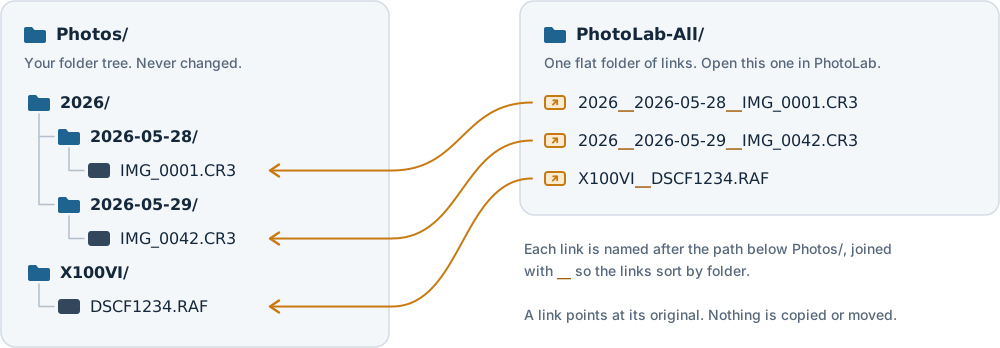
Photos filed in subfolders, by year, by day or by camera, never show up together in PhotoLab's folder browser. flatlink walks the whole tree and makes a link to every image in one flat folder. Open that folder in PhotoLab and it's all there.
Your photos are never moved, copied or changed. Each link is named after its path, so 2026/2026-05-28/IMG_0001.CR3 becomes 2026__2026-05-28__IMG_0001.CR3 and the links sort by folder. Running it again only adds new photos.
§ Features
--dry-runshows what would change without changing anything.--skip-paired-jpegsshows a RAW+JPEG shot once, as its RAW.--pruneremoves links whose originals are gone, but refuses when the source looks like an unplugged drive.- Covers JPEG, TIFF, HEIC, PNG and 24 RAW formats, or just the extensions you pick.
- Repoints links after photos move or a drive is renamed, keeping the names so edits stay attached.
- Flatlink.app does the same from a window, and can watch folders and update the links after each import.
§ At a glance
| Runs on | macOS 14 or later · Universal |
| Version | 1.1.4 · Sept 29, 2026 |
| Price | Free |
| License | MIT |
| Comes as | Command · Mac app |
| Link folder | APFS or Mac OS Extended |
§ Install
Install
brew install tsvb/tap/flatlink
brew install --cask tsvb/tap/flatlink-app
The first installs the command, the second the app. Or download Flatlink.app from the latest release. Both are signed and notarized and need no Python or other runtime.
§ Where your edits go
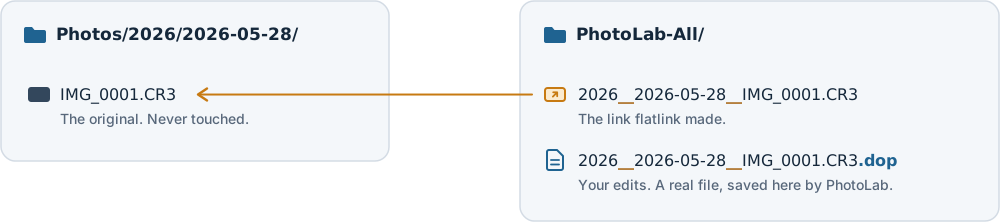
PhotoLab follows the links and saves its .dop edits next to the link, not next to the original. That makes the link folder the home of your edits, so keep it and run flatlink into it again rather than rebuilding it. flatlink only ever adds or removes links, never a .dop.
§ Not affiliated
flatlink isn't affiliated with or endorsed by DxO. DxO and PhotoLab are trademarks of DxO Labs.
§ Questions
- Does flatlink move, copy or change my photos?
- No. It only creates or removes links inside the link folder. The originals are never touched.
- Where does PhotoLab save my edits?
- In a
.dopfile next to the link, in the link folder. Keep that folder and run flatlink into it again instead of rebuilding it. - Does it work on Windows or Linux?
- No. It's macOS only, version 14 or later, on Apple silicon and Intel.
- How do I undo it?
- Delete only the links, for example
find ~/Pictures/PhotoLab-All -maxdepth 1 -type l -delete. That leaves your saved edits in place.